ByJohn A
Buying Office Chairs? Don’t Make These Common Mistakes
Snippet: Long hours in an uncomfortable office chair can cause back pain, poor posture, and reduced productivity. Choosing an ergonomic office chair with proper support, adjustability, and lasting comfort helps create a healthier workspace and improves daily performance.
Key takeaways:
- Choose Ergonomics: Improve posture and reduce strain.
- Check Adjustments: Ensure a personalized, comfortable fit.
- Prioritize Quality: Durable materials last longer.
- Fit Your Workspace: Match the chair to your desk and needs.
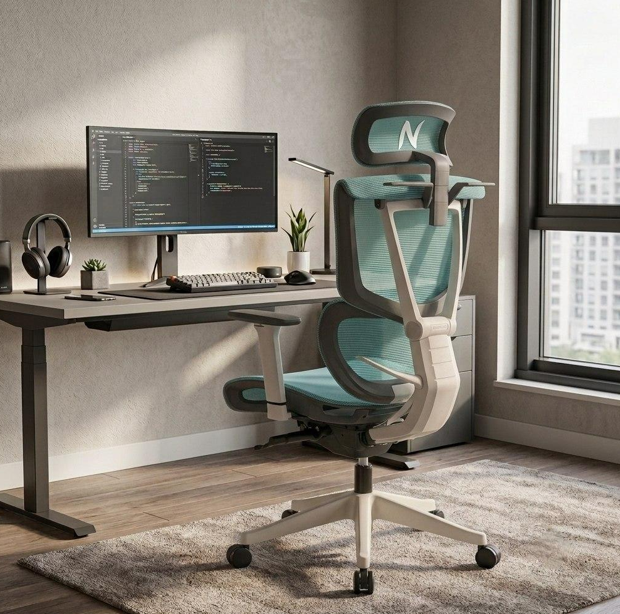
An individual spends several hours sitting daily, whether working from an office or from home. A traditional chair may increase strain on your neck, back, and shoulders, whereas a properly adjusted ergonomic office chair can support better posture and reduce discomfort during long working hours.
Long periods of sitting without proper support can contribute to muscle fatigue, poor posture habits, and discomfort. Choosing the right office chair requires more than focusing on appearance or price; factors such as adjustability, lumbar support, material quality, and durability play an important role in creating a comfortable workspace.
Ergonomic Office Chair vs Regular Computer Chair: What Is the Difference?
Choosing between an ergonomic office chair and a regular computer chair depends on how long you sit, the level of support you need, and the adjustability required for your workspace. While a regular chair may work for occasional use, an ergonomic chair is designed to provide better support and comfort during extended sitting.
| Factor | Ergonomic Office Chair | Regular Computer Chair |
| Designed for | Long working hours and daily use | Short-term or occasional sitting |
| Body support | Provides targeted support for the lower back, neck, and shoulders | Offers basic seating support with fewer ergonomic features |
| Adjustability | Multiple adjustments to fit different body types and sitting preferences | Limited adjustments, often focused on seat height only |
| Sitting experience | Encourages movement, better alignment, and personalized comfort | May require frequent adjustments or breaks during long sessions |
| Long-term value | Built for durability and consistent daily use | May require replacement sooner depending on usage |
Table 1: Key differences between ergonomic office chairs and regular computer chairs
What Not to Do when Buying an Ergonomic Office Chair
Avoiding these common mistakes can improve your comfort, support better posture, and help you invest in an ergonomic office chair that provides long-term value.
Buying Chairs Based on Price Alone
Price alone is not the only factor that determines the quality of an office chair. Low-priced chairs can be attractive but lack proper durability and support. Inexpensive chairs often wear out quickly and may lead to discomfort after extended use. Therefore, make a decision based on warranty, features, and build quality.
Ignoring Lumbar Support
One of the most common mistakes when buying a computer chair is overlooking lumbar support. Your lower spine benefits from proper support, as insufficient lumbar support can encourage poor sitting posture and increase discomfort over long periods. The features of lumbar support to look out for:
| Feature | Benefit |
| Adjustable height | Supports different torso heights |
| Forward-back adjustment | Matches the natural curve of the lower back |
| Firm but flexible padding | Helps reduce pressure points |
Table 2: Important features of adjustable lumbar support
Not Paying Attention to Height and Seat Depth
Seat depth directly affects posture and circulation. A small gap of around two to three fingers between the seat edge and the back of your knees helps prevent pressure on your legs and supports better circulation.
The right chair should fit your body comfortably, as one size doesn’t suit everyone. Common errors made while choosing chairs with the right seat are:
| Feature | Benefit |
| Seat width | Prevents pressure on the hip |
| Seat depth | Supports thighs comfortably |
| Backrest height | Supports the full spine |
| Weight capacity | Ensures durability and safety |
Table 3: Seat adjustment features to consider when buying an office chair
Skipping the Tension and Recline Test
Remaining in one fixed sitting position for long periods can increase discomfort and muscle fatigue, which is why controlled movement and recline adjustment are important. Many chairs lack tension control, which means that the recline feels either too loose or too stiff. A computer chair with a good recline system offers:
- Lock setting for different tasks
- Adjustable tension based on body weight
- Smooth multi-angle recline
Ignoring the Adjustability Feature of the Armrest
Poorly positioned armrests can place your shoulders in an unnatural position and contribute to neck and shoulder strain over time. 3D armrests move in depth, height, and pivot direction, which helps reduce pressure on the shoulders and upper back. Check for:
- Depth adjustment for arm length
- Height adjustment for desk clearance
- Pivot angle for writing and typing tasks
Not Checking Certification and Warranty
Do not skip checking chair certifications, as they indicate whether the product has been tested against recognized durability and safety standards. Look for certification labels that indicate the chair has undergone independent testing.
Warranty means long-term protection and accountability. Check for the coverage duration, parts that are covered, and a clear claim process.
Conclusion
Buying an office chair should never be a rushed decision. Comfort, support, and durability matter more than appearance alone. An ergonomic office chair can support better posture, reduce physical discomfort, and improve productivity during long workdays. A well-designed computer chair also contributes to a healthier and more productive work environment.
By avoiding common buying mistakes and evaluating factors such as lumbar support, adjustability, material quality, certifications, and warranty coverage, you can confidently choose a chair that delivers lasting comfort and reliable performance.
See also: Child Support in Tennessee: A Complete Guide to Protecting Your Child’s Financial Future
Ready to Upgrade Your Comfort?
Don’t settle for a chair that causes discomfort or limits your productivity. Choose an ergonomic seating solution designed around proper support, adjustability, and long-term comfort. Explore chairs that fit your workspace, support your posture, and help you work more comfortably every day.